

How to Use ChatGPT at Work in 2026: 25 Prompts to Save Time

ChatGPT is most useful at work when it removes the friction of a blank page—not when it replaces your judgment. With a clear prompt, it can turn rough notes into an email, organize a crowded task list, extract actions from meeting notes, or help you explore a problem.
This guide gives you 25 copy-and-paste ChatGPT prompts for work, a repeatable formula for improving them, and practical rules for using AI responsibly.
What can ChatGPT help you do at work?
ChatGPT can assist with writing, summarizing, brainstorming, explaining, and organizing information you provide. It is especially useful for routine knowledge work where a solid first draft saves time:
- Drafting and improving professional emails
- Summarizing reports, notes, and supplied documents
- Creating agendas, project plans, and presentation outlines
- Brainstorming campaigns, products, or solutions
- Explaining spreadsheet formulas and unfamiliar concepts
- Turning meeting notes into decisions and action items
- Preparing for interviews and customer conversations
The quality of the result depends heavily on the instructions and context you provide. Treat the response as editable work—not a finished, verified answer.
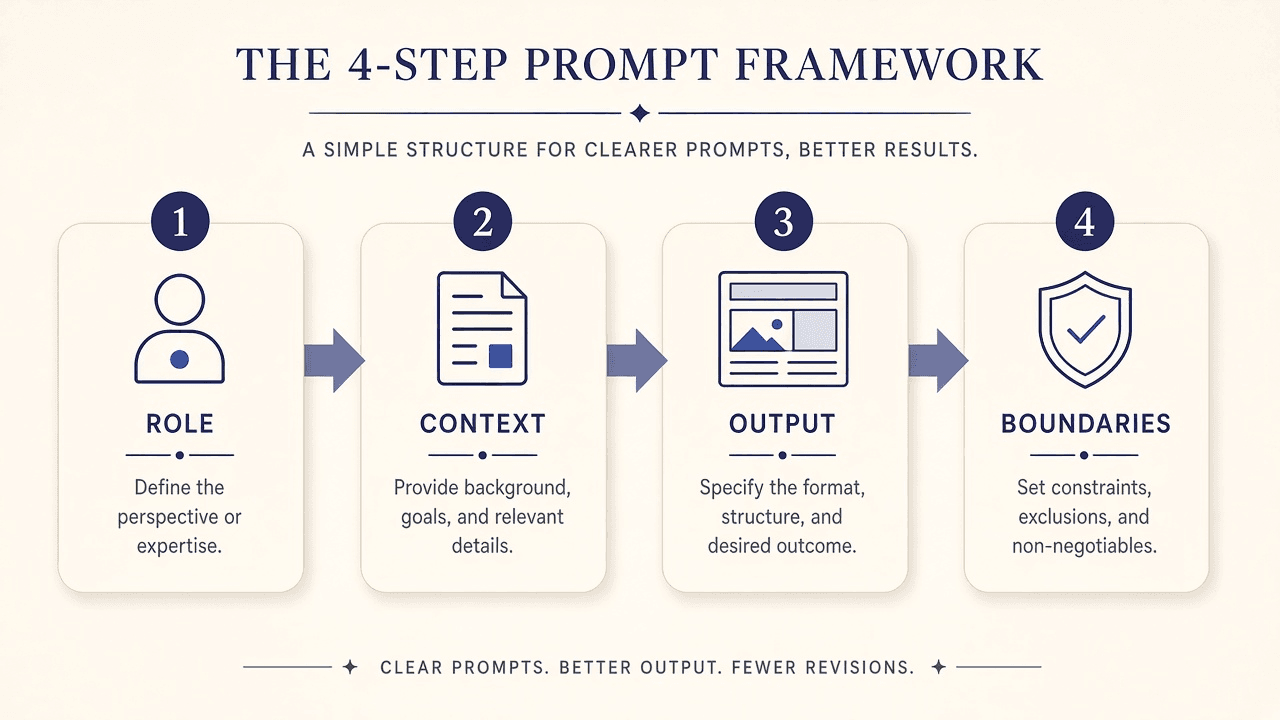
How do you write a better ChatGPT prompt?
Use this four-part formula:
- Role: Describe the kind of help you need, such as an editor, project planner, or spreadsheet tutor.
- Context: Include the audience, goal, background, source material, and real constraints.
- Output: Request a specific format—a short email, table, checklist, or step-by-step explanation.
- Boundaries: Say what must remain unchanged, what the model must not invent, and what requires verification.
Instead of asking, “Write an email,” try:
Write a polite, concise email to a client explaining that delivery has moved
from Friday to Monday. Say the additional time is needed for final quality
checks, apologize for the inconvenience, and invite questions. Do not add
reasons or commitments I have not provided.
Useful follow-ups include “make this shorter,” “give me two alternatives,” “identify assumptions,” and “ask me questions before recommending a solution.”
25 ChatGPT prompts for work
Replace the text in brackets with your details. Remove names, customer records, private financial data, credentials, and other sensitive information before pasting anything into an AI service.
Prompt 1
Write a professional email
Use it for: Turning rough notes into a concise, polished message.
Act as a business communication assistant. Write a clear and polite email to [recipient] about [topic]. The goal is to [goal]. Keep it concise, include an appropriate subject line, and do not invent details I have not provided.
Prompt 2
Summarize a long document
Use it for: Extracting the important points from text you supply.
Summarize the text below in plain language. Start with a five-point executive summary, then list key findings, important numbers, decisions, and action items. Flag anything unclear or missing instead of guessing.
[Paste text]
Prompt 3
Create a daily work schedule
Use it for: Planning realistic priorities around available time.
Plan my workday from [start time] to [end time]. My tasks, durations, and deadlines are: [list]. Prioritize urgent and important work, include short breaks, show what can be postponed, and do not schedule more time than is available.
Prompt 4
Improve your writing
Use it for: Making a report, email, or message clearer.
Improve the clarity, grammar, and flow of the text below without changing its meaning or facts. Preserve the intended tone. After the revision, briefly explain the three most important changes.
[Paste text]
Prompt 5
Brainstorm business ideas
Use it for: Exploring products, services, or campaigns.
Generate 10 practical ideas for a [type of business] serving [audience]. For each, explain the customer, benefit, resources required, and one challenge. Clearly separate assumptions from facts I provided.
Prompt 6
Prepare a meeting agenda
Use it for: Keeping a meeting focused on an outcome.
Create a 30-minute agenda about [topic]. Participants are [roles], and the desired outcome is [goal]. Include time allocations, discussion questions, decisions required, and action items to capture.
Prompt 7
Turn meeting notes into actions
Use it for: Producing an accountable follow-up.
Organize these notes into decisions, action items, open questions, and follow-ups. Create a table with task, owner, deadline, and status. If an owner or deadline is absent, write “Not specified” rather than inventing one.
[Paste notes]
Prompt 8
Explain an Excel formula
Use it for: Understanding what a spreadsheet formula does.
Explain this Excel formula in simple language: [formula]. Break down each function and argument, describe the result, and give a small example. Tell me which spreadsheet details you need rather than assuming them.
Prompt 9
Create a project plan
Use it for: Breaking a large project into manageable work.
Create a project plan for [project]. The deadline is [date], resources are [resources], and the outcome is [goal]. Include phases, tasks, milestones, dependencies, risks, and details that still need confirmation.
Prompt 10
Write a blog outline
Use it for: Structuring an article around reader questions.
Create a detailed outline about [topic] for [audience]. Include a useful title, introduction, logical H2 and H3 sections, practical examples, FAQs, and a conclusion. Do not invent search-volume or trend claims.
Prompt 11
Make a message friendlier
Use it for: Softening an abrupt message without losing clarity.
Rewrite this message so it sounds friendly, respectful, and professional without becoming overly formal. Preserve its meaning, facts, and deadlines.
[Paste message]
Prompt 12
Practice a job interview
Use it for: Improving answers through structured feedback.
Act as an interviewer for a [job title]. Ask 10 realistic questions one at a time. After each answer, give feedback on clarity, relevance, and structure. Do not invent experience or achievements for me.
Prompt 13
Write a resume summary
Use it for: Presenting relevant experience succinctly.
Write a concise resume summary targeting [job title]. My actual experience and skills are: [details]. Highlight relevant strengths in clear language without inventing qualifications, certifications, or results.
Prompt 14
Draft a business proposal
Use it for: Creating a structured first draft for a client.
Draft a proposal for [project or service] addressed to [audience]. Include the problem, solution, scope, deliverables, timeline, assumptions, and next steps. Use placeholders for pricing and commitments I have not supplied.
Prompt 15
Create a presentation outline
Use it for: Planning a clear slide narrative.
Create a presentation outline about [topic] for [audience], lasting [duration]. For each slide, provide a title, up to three key points, and a suggested visual. Keep the story logical and the slides uncluttered.
Prompt 16
Plan reliable research
Use it for: Finding questions and credible source types.
Help me research [topic]. List the main questions, relevant primary sources or authoritative organizations, and useful search queries. Separate established facts from claims requiring verification. Do not invent citations, links, or findings.
Prompt 17
Adapt a social announcement
Use it for: Rewriting one verified message for several platforms.
Turn this announcement into a professional LinkedIn post, a short X post, and an Instagram caption. Keep the facts consistent, adapt the tone to each platform, and add no unsupported claims.
[Paste announcement]
Prompt 18
Simplify a complex topic
Use it for: Learning unfamiliar or technical material.
Explain [topic] for a beginner. Start simply, provide a real-world example, define important terms, identify key limitations, and finish with three questions that test understanding.
Prompt 19
Draft a support response
Use it for: Responding empathetically without overpromising.
Draft an empathetic response to the customer message below. Acknowledge the concern, state only what is confirmed, and suggest an appropriate next step. Do not promise refunds, replacements, or timelines without authorization.
[Paste message]
Prompt 20
Run a weekly review
Use it for: Learning from one week and planning the next.
Organize these weekly notes into completed work, unfinished work, lessons, obstacles, and next-week priorities. Suggest realistic improvements without treating every unfinished task as a failure.
[Paste notes]
Prompt 21
Generate a product description
Use it for: Turning verified features into customer benefits.
Write a clear description for [product]. Verified features are [features], and the customer is [audience]. Explain practical benefits with readable formatting and avoid unsupported performance claims or promises.
Prompt 22
Create a learning plan
Use it for: Building a measurable path to a new skill.
Create a four-week plan for learning [skill]. I can spend [hours] weekly, and my level is [level]. Include weekly goals, practical exercises, review sessions, and ways to measure progress.
Prompt 23
Compare two options
Use it for: Organizing a decision without hiding uncertainty.
Compare [option A] and [option B] for [use case]. Use a table covering benefits, drawbacks, cost considerations, ease of use, and limitations. Separate provided facts from assumptions and request missing information.
Prompt 24
Improve a workflow
Use it for: Finding repetition, delays, and avoidable errors.
Analyze this workflow and suggest ways to make it simpler, faster, or less error-prone. Identify repetitive steps, unnecessary handoffs, automation opportunities, and risks. Explain each benefit and what to test first.
[Describe workflow]
Prompt 25
Build a productivity system
Use it for: Creating a routine that is simple enough to maintain.
Design a simple productivity system around my responsibilities, hours, deadlines, and preferred tools: [details]. Include daily planning, task tracking, a weekly review, and a method for unexpected work. Keep it realistic.
How do you use a ChatGPT prompt in a real workflow?
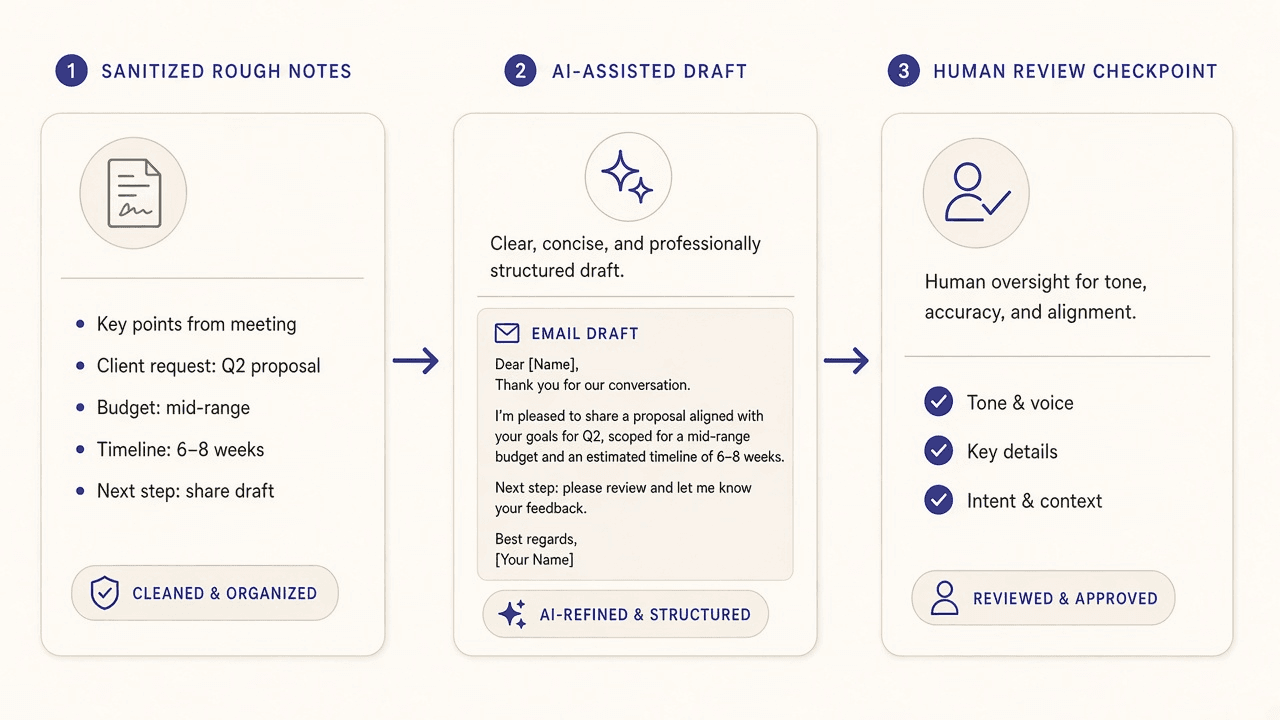
Imagine you need to tell a client that a deadline changed. A safe, effective workflow has four steps:
- Remove sensitive details. Replace the client name and confidential project details with neutral labels.
- Provide verified context. State the old date, new date, confirmed reason, desired tone, and any commitment you are authorized to make.
- Generate and refine. Ask for a concise draft, then request a shorter or warmer version if needed.
- Review before sending. Restore the correct details and check dates, promises, tone, and recipients yourself.
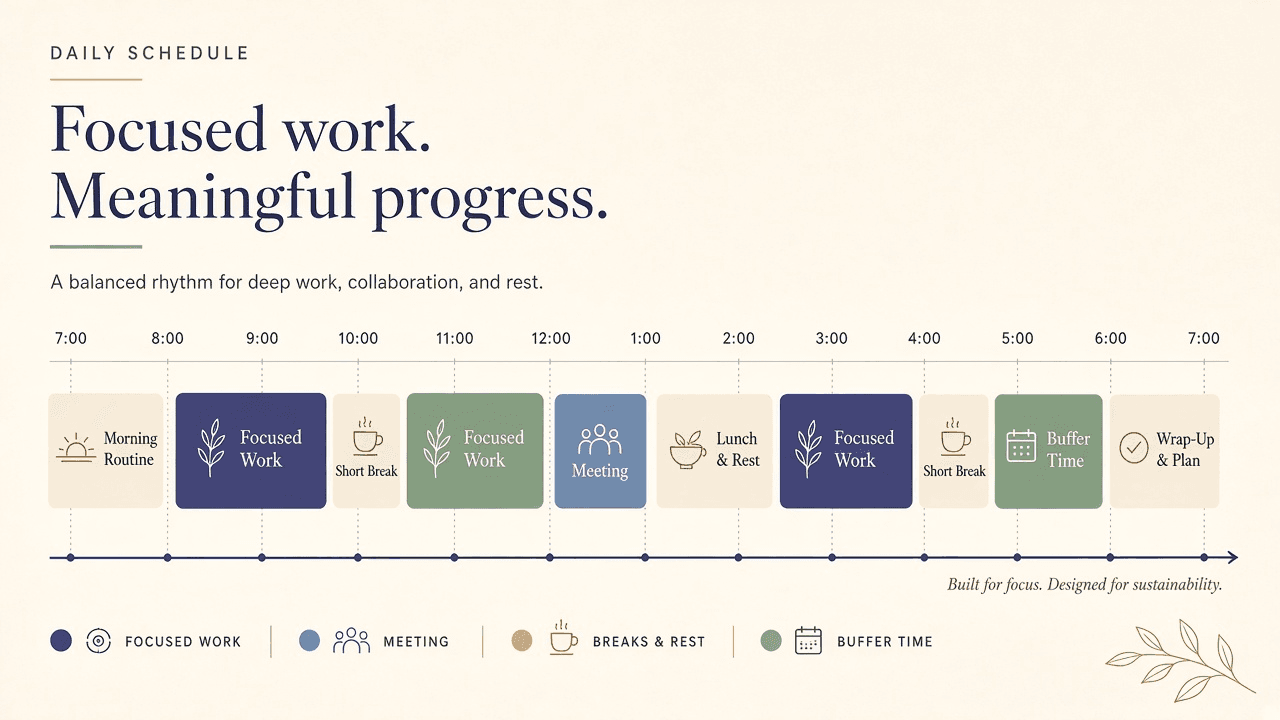
For planning, the same pattern works: provide a bounded task list, request a draft schedule, then adjust it to reflect your energy, interruptions, and real priorities.
ChatGPT versus doing the task manually
| Situation | ChatGPT can help with | You still need to |
|---|---|---|
| Email drafting | Producing and revising a starting draft | Confirm facts, tone, and recipients |
| Note summaries | Grouping supplied information | Check the source for omissions |
| Brainstorming | Generating varied possibilities | Judge feasibility and originality |
| Research planning | Listing questions and source types | Read and cite reliable sources |
| High-stakes decisions | Structuring options and uncertainties | Use accountable human expertise |
The goal is not to use AI for every task. Use it where faster iteration is valuable, and work manually where direct control, confidentiality, or expert accountability matters more.
What mistakes should you avoid when using ChatGPT at work?
- Pasting confidential data: Follow your employer’s AI and data-handling policies. When uncertain, do not upload the information.
- Sending the first draft unchanged: Check every name, number, date, link, quotation, and commitment.
- Asking vague questions: Include the outcome, audience, constraints, and desired format.
- Trusting confident language: A fluent answer is not proof that it is correct.
- Using AI outside your authority: Do not let a draft promise refunds, legal terms, prices, deadlines, or policy exceptions you cannot approve.
- Replacing specialist review: Legal, financial, medical, security, and other high-stakes work needs qualified oversight.
ChatGPT has offered free and paid access, but plans, limits, and features can change. Check the official ChatGPT website for current information instead of relying on an old comparison.
Frequently asked questions
What is the best ChatGPT prompt for productivity?
There is no universal best prompt. Start with your goal, constraints, and desired output: “Prioritize these tasks, build a schedule between 9 a.m. and 5 p.m., include two breaks, and show anything that does not fit.”
Can beginners use ChatGPT for office work?
Yes. Everyday language is enough. Begin with a narrow task, inspect the answer, then add missing context or ask for a different format.
How can I make ChatGPT responses more accurate?
Provide source material, concrete constraints, and examples of the desired result. Ask it to identify uncertainty instead of guessing, then independently verify important claims.
Can ChatGPT analyze spreadsheets?
It can explain formulas and help reason about spreadsheet problems. Available upload and analysis features vary, and you should always test formulas and calculations in the actual workbook.
Should I disclose that I used AI?
Follow your employer, client, school, publisher, and professional rules. Disclosure expectations vary by organization and type of work.
A final checklist before using AI-generated work
- I removed or protected confidential and personal information.
- I gave the model enough verified context.
- I checked names, dates, numbers, links, and quotations.
- I removed invented claims and unsupported promises.
- The final work sounds appropriate for its audience.
- A qualified person reviewed any high-stakes content.
- I am comfortable taking responsibility for the result.
ChatGPT can make routine work easier when you use it as a drafting and thinking partner. Save the prompts that work, adapt them to your role, and keep human judgment at the center of every important decision.